Transparent header
The transparent header is set per page, not globally. You turn it on from the Elementor page editor.
How it works
Section titled “How it works”A transparent header has no background color, so page content (like a hero image or full-width banner) shows through behind the header text and logo. This creates a clean look for landing pages.
Turn on transparent header
Section titled “Turn on transparent header”- Open the page in Elementor.
- Then open Page Settings panel.
- Go to the Header section.
- Turn on Enable transparent header.
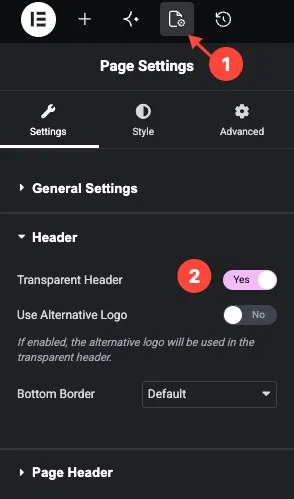
You can also enable Use Alternative Logo to optionally set a different logo for the transparent state (e.g. a white version).
Colors for transparent state
Section titled “Colors for transparent state”When transparency is on, the text and link colors switch to a separate set so they stay readable against the page background. These are set in the same Page Settings → Style -> Header section.
| Setting | Description |
|---|---|
| Text color | Color for header text and links when transparent. |
| Background color | Color for hover states and interactive elements. |